How to Turn a Beat Into a Full Song
Turning a beat into a full song is defined as the process of taking a repeating loop and transforming it into a structured arrangement with distinct sections, dynamic contrast, and intentional energy flow. Most producers can build a compelling 8-bar loop in Ableton Live, FL Studio, or Logic Pro within an hour. The real skill, and the one that separates finished tracks from abandoned projects, is arrangement. This guide covers the exact workflow to create a song from a beat, from duplicating your loop across a timeline to mastering for streaming platforms.
How to turn a beat into a full song through arrangement
Arrangement is the primary lever that converts a beat into a complete track. It is defined as the deliberate control of which elements play at which moment, and it is the step that creates the musical narrative your listener follows from start to finish. Arrangement controls element entrance and exit rather than requiring you to compose entirely new material for every section. That distinction matters because it means you already have most of what you need the moment your loop sounds good.
The most practical method for independent producers is subtractive arrangement. You copy your main loop across the full timeline, then mute or delete layers per section to create contrast. A common approach is pasting the loop across 128 bars and carving out five or more distinct sections by removing elements rather than adding new ones. This preserves musical consistency and makes transitions feel natural instead of jarring.
A standard electronic and beat-driven structure follows this shape:
- Intro: 8 to 16 bars. Sparse. Sets mood without revealing everything.
- Build: 8 to 16 bars. Layers enter gradually. Tension rises.
- Drop/Chorus: 16 to 32 bars. Full energy. The payoff.
- Breakdown: 8 to 16 bars. Strip back to drums or atmosphere only.
- Second build: 8 bars. Shorter than the first. Listener knows what's coming.
- Second drop: 16 to 32 bars. Full energy again, sometimes with variation.
- Outro: 8 to 16 bars. Elements exit one by one.
Pro Tip: Before you touch a single mute button, label every track in your DAW with a color code. Drums in red, bass in blue, melodic elements in green. When you're working across 128 bars, visual clarity cuts your editing time in half.
What does each song section actually do?

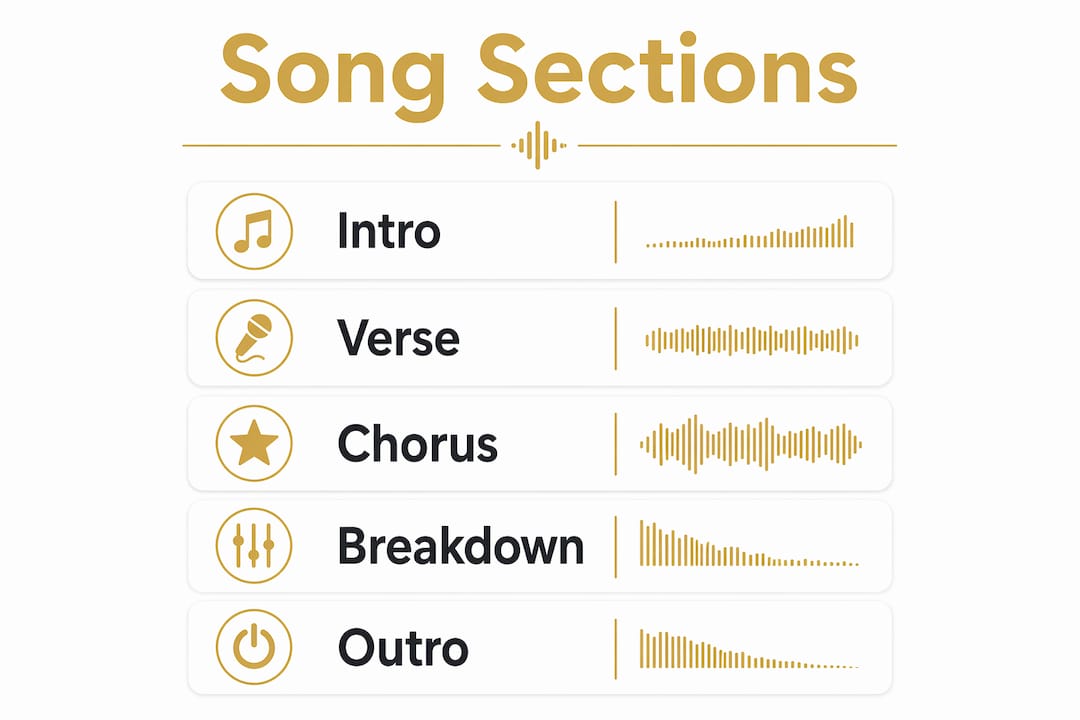
Every section in a full song serves a specific function, and understanding that function tells you exactly which elements to keep or remove. The intro sets the mood without front-loading every sound you have. Think of it as a handshake: give the listener just enough to commit to the next 30 seconds. The verse (or pre-drop in electronic music) builds context and tension. The chorus or drop is the emotional payoff, the moment everything lands at once.
The breakdown is where most producers make their biggest mistake. Stripping back to a single element, a filtered pad or a lone hi-hat pattern, creates the contrast that makes your drop hit harder the second time. Bridges typically appear after the second chorus and introduce harmonic or melodic contrast through new chord progressions or melodies, refreshing listener attention before the final section. The outro mirrors the intro: elements exit gradually, and the track closes without abruptly cutting off.
The table below maps each section to its core function and the typical element changes that define it:
| Section | Function | Element changes |
|---|---|---|
| Intro | Establish mood | Sparse: melody or atmosphere only |
| Verse/pre-drop | Build tension | Add bass, remove lead melody |
| Chorus/drop | Full energy payoff | All elements present |
| Breakdown | Reset and contrast | Strip to drums or pads only |
| Bridge | Harmonic refresh | New chord or melodic idea |
| Outro | Resolve and close | Elements exit one by one |
Pro Tip: Use DAW markers (called "locators" in Ableton Live and "markers" in FL Studio and Logic Pro) to label each section before you start muting. Drop a marker at bar 1 for Intro, bar 17 for Build, and so on. You will arrange twice as fast because you stop second-guessing where you are in the timeline.
Step-by-step workflow to develop a beat into a complete track
This is the sequence that takes you from a finished loop to an export-ready song. Follow it in order and resist the urge to skip ahead to mixing before your arrangement is locked.
- Duplicate your loop across the full timeline. Paste it across 128 bars. Every track, every element, all the way to the end. This is your master loop.
- Create sections by muting, not building. Go section by section and mute or delete tracks to match the function of each part. Muting elements per section preserves musical consistency and avoids the trap of building each section from scratch.
- Add transitions between sections. A filtered noise riser over 4 bars before your drop, a crash cymbal on the downbeat of your chorus, a bass drop at the breakdown. Risers and crash cymbals are the simplest tools to smooth the listener's experience between sections.
- Layer and automate for detail. Once sections are defined, add fills, one-shot samples, and volume automation on specific elements (not the master fader) to add movement within sections.
- Lock the arrangement before mixing. Do not touch EQ or compression until every section sounds correct structurally. Mixing an unfinished arrangement wastes time.
- Build a static mix first. Set levels and panning with no heavy plugins active. A static mix accounts for roughly 70% of a great final mix outcome. Getting your balance right before adding EQ and compression reduces decision fatigue and produces better translation across speakers and headphones.
- Master to streaming targets. Aim for around -14 LUFS integrated loudness with a true peak ceiling near -1 dBTP to comply with Spotify and Apple Music platform standards.
A few additional points worth keeping in mind:
- Set a hard deadline for each step. Arrangement done by day two. Mix done by day four. Master done by day five.
- Bounce your arrangement to audio before mixing. It forces a decision and prevents infinite tweaking.
- Use a reference track throughout. Pull up a commercially released song in the same genre and compare your levels, energy, and section lengths directly.
Pro Tip: Limit yourself to three plugins per channel during mixing. Unlimited options create unlimited reasons to keep tweaking. Constraint forces better decisions faster.
Common challenges when expanding a beat into music
The most common reason producers never finish a track is spending too long perfecting the loop before touching the arrangement. A loop that sounds 90% right is ready to arrange. Waiting for 100% means you will never start. Setting a fixed finish date and treating it as non-negotiable is the single most effective habit for increasing your completion rate.
"Loop limbo" is the specific trap where a producer cycles through the same 8 bars for weeks without moving forward. The fix is mechanical: open a new session, paste your loop across 128 bars, and force yourself to mute something within the first five minutes. Motion creates momentum.
Here are the most common pitfalls and their direct solutions:
- Using volume automation as your only energy tool. Changing density (which elements are present) creates more dramatic contrast than turning the master fader up and down.
- Abrupt transitions. If a section change sounds jarring, add a 2-bar riser before it and a crash on the downbeat. That combination fixes 90% of rough transitions.
- Endless mixing tweaks. Finishing music is less about technique and more about overcoming the decision gap with hard deadlines and session constraints. Set a timer. When it goes off, export and move on.
- Skipping reference tracks. Your ears adjust to your own mix within 20 minutes. A reference track recalibrates your perception instantly.
The arrangement is not the enemy of creativity. It is the structure that makes creativity audible to someone who has never heard your loop before.
Why arrangement discipline matters more than sound design
I have worked with producers at every level, and the pattern is consistent. The ones who finish tracks are not the ones with the best plugins or the most expensive monitors. They are the ones who treat arrangement as a non-negotiable step rather than an afterthought. I spent two years chasing the perfect snare sound before I realized my real problem was that I had never finished a song. The snare was fine. The arrangement was missing.
The "decision gap" is real. It is the moment between knowing what to do next and actually doing it, and it is where most projects die. The fix is not inspiration. It is structure. I now set a rule for myself: if a loop has been sitting in my projects folder for more than three days without an arrangement started, I open it, paste it across 128 bars, and mute half the tracks before I do anything else. That one action breaks the paralysis every time.
Completing a series of tracks, even imperfect ones, teaches you more than perfecting a single loop for six months. Each finished song reveals a specific weakness in your process. One track shows you that your transitions are weak. The next shows you that your breakdowns are too long. You can only see those patterns by finishing. The Session Ready Vol. 1 pack from Beatpacks was built with exactly this philosophy: give producers a strong foundation so the arrangement work can start immediately, not after weeks of sound design.
Jay
Start with beats that are already built for full songs

The fastest way to apply everything in this guide is to start with a beat that was designed with arrangement in mind from the beginning. Beatpacks offers professionally crafted beat packs built by Billboard-charting producer Mini Producer, each structured to support full song development rather than just loop playback. Every pack includes stems and layers that make subtractive arrangement straightforward from the first session. The Beat Packs + Bonuses collection adds extra resources that accelerate your workflow further, including additional stems and production assets. If you are ready to stop arranging from scratch and start finishing tracks, Beatpacks gives you the production foundation to do it at a professional level.
Key takeaways
Turning a beat into a full song requires arrangement discipline, subtractive workflow, and a locked structure before mixing begins.
| Point | Details |
|---|---|
| Arrangement is the core skill | Control which elements play when, not how many new ideas you add. |
| Use subtractive arrangement | Paste your loop across 128 bars and mute elements per section for consistency. |
| Lock structure before mixing | A static mix accounts for roughly 70% of a great outcome; do not mix an unfinished arrangement. |
| Set hard deadlines | Fixed finish dates are the most effective tool for overcoming loop limbo and perfectionism. |
| Master to platform standards | Target -14 LUFS and a true peak near -1 dBTP for Spotify and Apple Music compliance. |
FAQ
What does it mean to turn a beat into a full song?
Turning a beat into a full song means taking a repeating loop and arranging it into distinct sections (intro, verse, chorus, breakdown, outro) with intentional energy changes and transitions. Arrangement, not new composition, is the primary method.
How many bars should a full song arrangement be?
A standard electronic or beat-driven song runs between 96 and 160 bars depending on tempo and genre. A typical structure uses intro (8 to 16 bars), drop (16 to 32 bars), breakdown (8 to 16 bars), and outro (8 to 16 bars).
What is subtractive arrangement?
Subtractive arrangement is the method of copying your full loop across the entire timeline and then muting or removing elements per section to create contrast. It preserves musical consistency and is faster than building each section from scratch.
What LUFS should I target when mastering for streaming?
Spotify targets approximately -14 LUFS integrated loudness, and Apple Music targets around -16 LUFS, with a true peak ceiling near -1 dBTP across both platforms. Mastering to these targets prevents your track from being turned down automatically by the platform.
How do I stop getting stuck in loop limbo?
Set a hard deadline: give yourself no more than three days on a loop before starting the arrangement. Paste the loop across 128 bars and mute half the tracks immediately. Motion breaks the paralysis faster than any creative technique.